
Прочитано:
15 789
Задача: Разобрать шаги по сбросу пароля на Windows Server 2012 R2
Итак, у меня есть установленный образ Windows Server 2012 R2 Std под Virtualbox моей основной системы ноутбука Lenovo E555 Ubuntu Trusty Desktop (рабочее окружение Gnome Classic).
Запускаю пакет управления виртуальными машинами:
Приложения — Системные утилиты — Oracle VM Virtualbox, нахожу контейнер с именем WS2012R2_#1, запускаю его и открываю свойства данной виртуальной машины чтобы смонтировать с развернутой системой установочный диск с которого сейчас нужно будет произвести запуск:
Устройства — Оптические диски — Выбрать образ диска и указываю путь до местонахождения в системе установочного образа, в моем случае: Server2012R2_EN_DV9.ISO
Затем отправляю виртуальную машину в перезагрузку
VM: WS2012R2_#1 — Машина — Перезапустить (или сочетание клавиш: Ctrl + R если окно консоли виртуальной машины открыто), в момент когда на экране появится надпись «Press any key to book from CD or DVD» нужно нажать клавишу Enter, после чего соглашаемся (нажимаем кнопку Next) с выставленными настройками установщика, такими как:
- Language to install: English (United States)
- Time and currency format: English (United States)
- Keyboard or input method: US
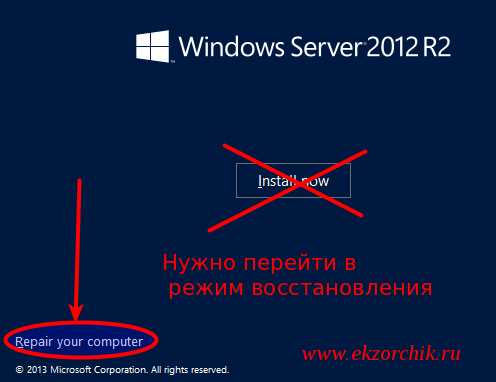
На следующем шаге нужно не нажимать «Install Now», а нажать «Repair your computer», см. скриншот ниже для наглядного понимания:
 После входа в расширенное меню следует перейти нажав на иконку с изображением отвертки и гаечного ключа (Troubleshoot), а потом на иконку с изображением консоли командной строки (Command Prompt) и передо мной предстает запущенная консоль, как можно заменить с правами Администратора ожидающая ввода команд:
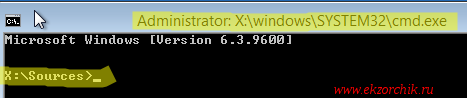
Здесь нужно ввести следующие команды аналогичные тем которые вводились в заметке по сбросу пароля на системную учетную запись в Windows Server 2008 R2, но можно и не сбрасывать пароль, а создать логин и пароль и дать административные привилегии:
X:Sources>copy d:WindowsSystem32Utilman.exe d:WindowsSystem32Utilman.exe.backup
X:Sources>copy d:WindowsSystem32cmd.exe d:WindowsSystem32Utilman.exe
Overwrite d:WindowsSystem32Utilman.exe? (Yes/No/All): y
Затем отключаю смонтированный инсталляционный образ Windows от контейнера с виртуальной системой:
Устройства — Оптические диски — Изъять диск из привода
Выключаю VM, закрыв открытое окно консоли командной строки и нажав на иконку «Turn off your PC»
Включаю VM, когда экран встанет на этапе нажатия сочетания клавиш: Ctrl + Alt + Del нужно нажать вот сюда (см. скриншот ниже), если не проделывалась процедура подмены исполняемого файла Utilman.exe, то ранее здесь бы запустилась утилита «Центра специальных возможностей», но т. к. я ее подменил, то запуститься консоль командной строки с правами СИСТЕМЫ, а это много больше чем административные права:
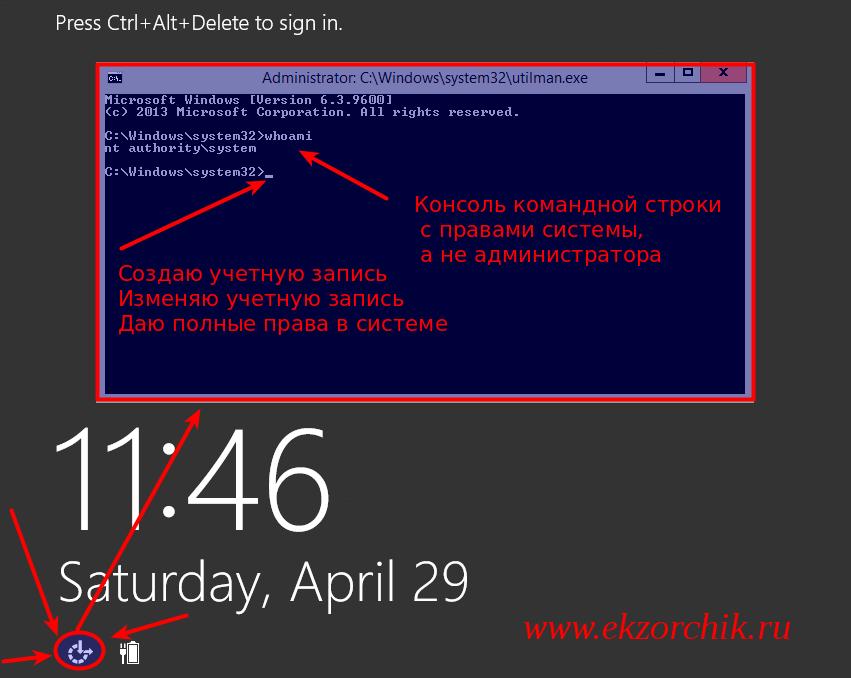
Когда такая консоль, системная консоль запущена в этот момент с системой можно делать все что угодно, создавать административного пользователя:
C:Windowssystem32net user ekzorchik 712mbddr@ /add
C:Windowssystem32net localgroup Administrators ekzorchik /add
Сбросил пароль на дефолтную административную учетную запись с логином Administrator:
C:Windowssystem32net user Administrator 712mbddr@
По такому же принципу, но с использованием консольных команд можно делать с системой все что необходимо.
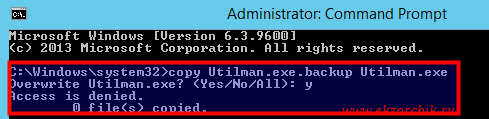
После того, как нужно еще раз загрузиться с установочного диск и произвести возврат utilman.exe на свое законное место, т. к. если попытаться проделать эту процедуру авторизовавшись в системе под административной учетной записью сделать этого не получиться. В доступе на такое посягательство исполняемых файлов администратору системы будет отказано от системы.
C:Windowssystem32copy Utilman.exe.backup Utilman.exe
Overwrite Utilman.exe? (Yes/No/All): y
Access is denied.
 К чему я писал данную заметку, просто у меня несколько дней назад была история. На домен контроллере поехало время, остановилась репликация, не работала авторизация ни под какой учетной записью на домен контроллере под управлением Windows Server 2012 R2 Standard, а вот с помощью шагов выше я попал в систему через восстановление контроллера домена и восстановил контроль на инфраструктурой. На этом у меня все, с уважением автор блога Олло Александр aka ekzorchik.
- Remove From My Forums
-
Question
-
I just installated windows server 2012, assigned a password and wrote it down. Upon trying to sign in, I get the message that the password is wrong. How can I reset it?
Marianne
Answers
-
Hi,
To reset the password on your Windows 2012 server, simply complete the following steps:
- Boot from the Micrsoft Windows Server 2012 DVD
- From the Windows Setup menu, click “Next”.
- Select “Repair your computer”
- Under Choose and option, click on “Troubleshoot”.
- Under Advanced options, click “Command Prompt”.
- At the command prompt, run the following commands:
d: cd windowssystem32 ren Utilman.exe Utilman.exe.old copy cmd.exe Utilman.exe - Close the command prompt and then click “Continue”.
- The server should now boot and present the logon screen. Here click Windows Key + U.
- At the prompt you can now change the password, by typing the following command:
net user administrator Password123 This will set the password for the Administrator user to be Password123 (case sensitive).
Refer below link.
Regards,
MD Disclaimer: The opinion expressed herein are my own knowledge. Deploy this at your own risk. Whenever you see a helpful reply, just click on “Propose As Answer” / “Marked As Answer” and please do «VOTE».
-
Marked as answer by
Friday, December 6, 2013 11:10 AM
-
Title «how I reset Windows Server 2012 administrator password without installation cd»s?«
Answer — If you do not have a password, you can’t. You need the installation media.
.:|:.:|:. tim
-
Marked as answer by
AnnaWY
Friday, December 6, 2013 11:10 AM
-
Marked as answer by
- Remove From My Forums
-
Question
-
I just installated windows server 2012, assigned a password and wrote it down. Upon trying to sign in, I get the message that the password is wrong. How can I reset it?
Marianne
Answers
-
Hi,
To reset the password on your Windows 2012 server, simply complete the following steps:
- Boot from the Micrsoft Windows Server 2012 DVD
- From the Windows Setup menu, click “Next”.
- Select “Repair your computer”
- Under Choose and option, click on “Troubleshoot”.
- Under Advanced options, click “Command Prompt”.
- At the command prompt, run the following commands:
d: cd windowssystem32 ren Utilman.exe Utilman.exe.old copy cmd.exe Utilman.exe - Close the command prompt and then click “Continue”.
- The server should now boot and present the logon screen. Here click Windows Key + U.
- At the prompt you can now change the password, by typing the following command:
net user administrator Password123 This will set the password for the Administrator user to be Password123 (case sensitive).
Refer below link.
Regards,
MD Disclaimer: The opinion expressed herein are my own knowledge. Deploy this at your own risk. Whenever you see a helpful reply, just click on “Propose As Answer” / “Marked As Answer” and please do «VOTE».
-
Marked as answer by
Friday, December 6, 2013 11:10 AM
-
Title «how I reset Windows Server 2012 administrator password without installation cd»s?«
Answer — If you do not have a password, you can’t. You need the installation media.
.:|:.:|:. tim
-
Marked as answer by
AnnaWY
Friday, December 6, 2013 11:10 AM
-
Marked as answer by
- Remove From My Forums
-
Question
-
I just installated windows server 2012, assigned a password and wrote it down. Upon trying to sign in, I get the message that the password is wrong. How can I reset it?
Marianne
Answers
-
Hi,
To reset the password on your Windows 2012 server, simply complete the following steps:
- Boot from the Micrsoft Windows Server 2012 DVD
- From the Windows Setup menu, click “Next”.
- Select “Repair your computer”
- Under Choose and option, click on “Troubleshoot”.
- Under Advanced options, click “Command Prompt”.
- At the command prompt, run the following commands:
d: cd windowssystem32 ren Utilman.exe Utilman.exe.old copy cmd.exe Utilman.exe - Close the command prompt and then click “Continue”.
- The server should now boot and present the logon screen. Here click Windows Key + U.
- At the prompt you can now change the password, by typing the following command:
net user administrator Password123 This will set the password for the Administrator user to be Password123 (case sensitive).
Refer below link.
Resetting Administrator Password in Windows 2012
Regards,
MD Disclaimer: The opinion expressed herein are my own knowledge. Deploy this at your own risk. Whenever you see a helpful reply, just click on “Propose As Answer” / “Marked As Answer” and please do «VOTE».
-
Marked as answer by
Friday, December 6, 2013 11:10 AM
-
Title «how I reset Windows Server 2012 administrator password without installation cd»s?«
Answer — If you do not have a password, you can’t. You need the installation media.
.:|:.:|:. tim
-
Marked as answer by
AnnaWY
Friday, December 6, 2013 11:10 AM
-
Marked as answer by
Рассмотрим как выполнить сброс пароля от учетной записи Администратор в ОС Windows Server 2008 R2/Windows Server 2012 R2.
Инструкция
Перезагружаем сервер и запускаемся с установочного диска Windows Server 2008 R2/Windows Server 2012 R2.

Выбираем режим Repair your computer (Восстановление системы)

Выбираем Troubleshoot (Устранение неполадок)

В разделе Advanced options (Дополнительные параметры) нажмите Command Promt (Командная строка)

В командной строке выполните следующие команды:
|
d: cd windows system32 ren Utilman.exe Utilman.exe.old copy cmd.exe Utilman.exe |
Закройте командную строку и нажмите Продолжить.

Система загрузится в обычном режиме. На экране входа в систему, нажмите комбинацию клавиш Windows + U.

В командной строке вы можете изменить пароль, введя следующую команду:
|
net user administrator Password123 |

После смены пароля перезагружаем систему и загружаемся с установочного диска. Необходимо вернуть файлы в исходное состояние, в командной строке выполняем действия:
|
d: cd windowssystem32 del utilman.exe и подтверждаем удаление copy utilman.exe.old utilman.exe |
Перезагружаем систему и входим под учетной записью администратора с указанным паролем.
Понравилась или оказалась полезной статья, поблагодари автора
ПОНРАВИЛАСЬ ИЛИ ОКАЗАЛАСЬ ПОЛЕЗНОЙ СТАТЬЯ, ПОБЛАГОДАРИ АВТОРА
 Загрузка…